What's New · Qik Office
A Global Agent That Delegates, Room Automations, Forms and Appointments — in 13 Languages
A global agent that delegates
Ask your global agent anything about your week. It reads across every room you are in, and when the work belongs to a specific room, it hands it to that room’s own AI project manager or AI assistant — with the command already written.
- One question, the whole office — Overdue tasks, upcoming meetings and open items from every room, answered in one place.
- Hand-offs to room agents — Each hand-off card names the room and why it belongs there, and opens the room with the command ready to send.
- The right context every time — The room agent runs the work with that room’s own members, history and apps.
- Actions in any room — Add a task to another room straight from the global agent.
Room automations
Describe a routine in plain words and your AI project manager compiles it into clear steps you approve. From then on it runs on its own — every time the trigger fires.
- WhenA meeting ends in this roomand the meeting has a client invitee
- ThenPost the minutes to the room chat
- ThenEmail the action itemsTo: the client invitees
- Triggers for real work — When a meeting ends, a task changes, a message arrives, a table row is added, or on a schedule.
- Conditions in plain words — Every condition reads like a sentence, so the whole team can see exactly when an automation fires.
- Email delivery steps — Send results to the right people, with recipients shown on the card before you approve.
- Fixed-step automations run free — When every step is a fixed action, the run uses no credits. Agent-led steps use credits only when they run.
- Run history — See every firing, what it did, and who it acted for.
- Build free, go live with Pro — Create and test automations on any plan; switch them live with AI Office Pro or Enterprise.
Room forms
Forms now live in the room, next to the table they write to — and a global Forms tab gathers every form you can fill or manage, across all your rooms.
- Forms that reopen — Weekly reports, monthly check-ins and recurring requests reopen on schedule, with reminders for anyone yet to submit.
- Review and correct — Send a submission for review; reviewers can check the answers and correct them, and every revision updates the same row.
- Filled in for you — Person fields can fill themselves from whoever submits, so approvals always route to the right people.
- Who can submit — Anyone with the link, signed-in people, or only your company.
- Real attachments — Upload files and photos straight into the form.
- Forms that start work — A new submission can start an agent workflow case or fire a room automation.
Room Appointments
Any room can now publish a booking page. Pick the length, set your weekly hours, override single days, and choose where the meeting happens — then share one link. Bookings land in the room with everything your agent needs to prepare.
- Book without signing in — Guests book with just a name and email, and see only their own meeting.
- Invitees on every card — The booking page, the room chat and the booking card all show who you are meeting. Tap a face to open their business card.
- Bookings per person — Cap how many slots one person can hold, so the calendar stays open for everyone.
- Hosts stay in control — Room owners and host invitees can reschedule or cancel a booking in a tap.
- One Appointments tab — Every calendar you are invited on, across all rooms, with approvals and upcoming bookings at the top.
Room tables, ready for teams
Tables now carry the views your team works from, stay in sync across rooms, and export cleanly.
| Company | Stage | Owner | Value |
|---|---|---|---|
| Northwind | Proposal | AK | $24,000 |
| Blue Harbor | Demo booked | MS | $12,500 |
| Lumen Labs | Won | RJ | $40,000 |
- Default views — Save as many views as you like and set the one everyone opens first.
- Synced tables — Sync a table into another room and see who synced it.
- Clean exports — Downloads keep the table name, ready to share.
- Agent writes to tables — Your agent can add and update rows straight from the conversation, with room and table creators holding edit rights.
- Faces on hover — Hover a person in any table to see who they are.
Jira, inside the room
Connect a room to Jira from its new Integrations surface, and the work you agree on in meetings flows straight into your backlog.
- Action items to backlog — Send a meeting’s action items to Jira from the AI minutes, one meeting at a time or all at once.
- Three switches per sprint — Push changes, pull changes, and choose whether a Jira delete removes the task.
- Room-level connect — Each room links its own Jira project and imports existing issues in one step.
Qik Office in 13 languages
Choose your language in Settings and the whole interface follows — including notifications. Arabic gets a full right-to-left layout.
Departments that own their workspaces
Departments now own workspaces and have a reporting head, so the AI Office mirrors how your company is really organized.
- Guided department setup — Create a department and pick its people and rooms in one flow.
- Access that follows the org — Department members join the right rooms automatically.
- Smarter bulk import — Import people with clear, predefined roles.
Also in September
- REST API with OAuth — Connect your own systems securely, enabled per company through Company policies.
- Room name ideas — Creating a room suggests names that fit the workspace and department.
- Live meeting widget — A LIVE or REC badge and a running clock on every meeting in progress.
- Web push notifications — Stay in the loop in the browser, even when Qik Office is in the background.
- Rocky Linux 9 — The desktop app now installs on Rocky Linux 9 with an RPM package.
- Drag to reorder tabs — Arrange your open rooms the way you work.
Today's Planner Arrives — Plus On-Command Agents and Passkey Sign-In
Today's Planner
One view for everything on your plate — schedules, tasks, reminders, and meetings — with your agent sitting right at the top of it. Today's Planner opens to a running count of what's on your plate, so you know what today looks like before you open anything else.
- Meeting cards carry their own agenda checklist — tick off Introduction, Discussion, and Conclusion as the room moves
- Recurring meetings and video calls are marked inline, no need to open the invite
- Live sync captures the actual meeting window and generates minutes automatically
- Jump straight to your full calendar, task list, or meeting list from the bottom bar
Agents that run on command
The same assistant now works two ways: as a global agent you can direct from anywhere, and as a dedicated agent scoped to a single private room.
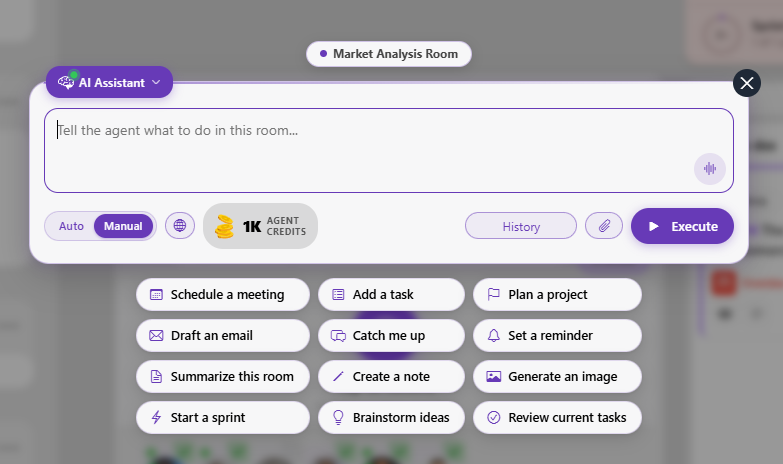
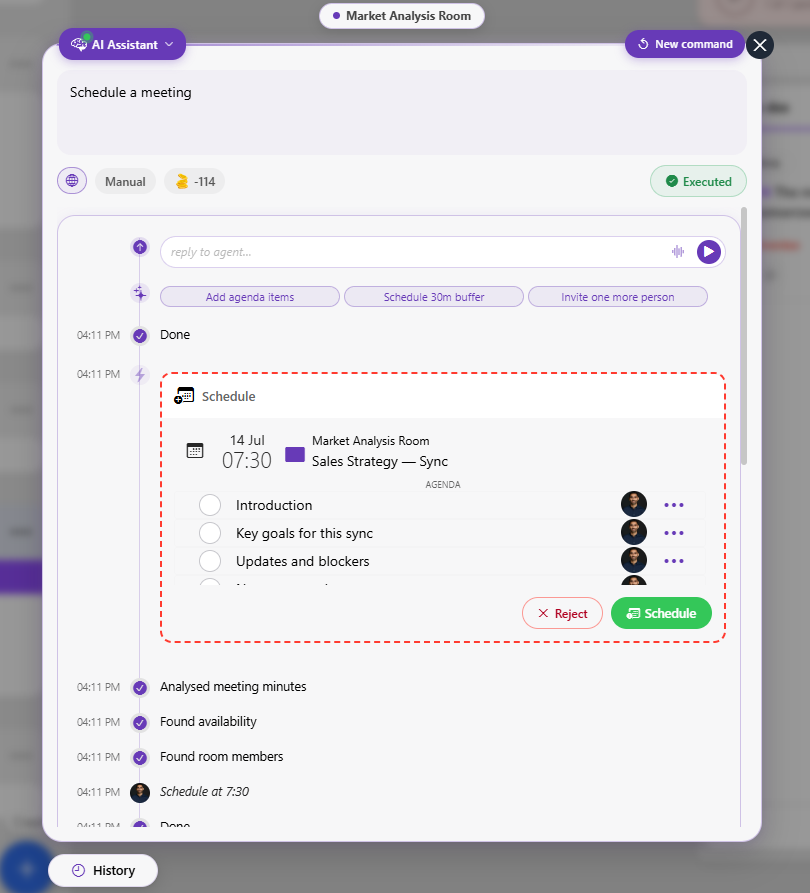
- Global command runs — Type an instruction, switch between Auto and Manual, and hit Execute. Schedule a meeting, draft an email, set a reminder, create a workspace, start a sprint, or brainstorm ideas in one line, with history tracking everything you've asked it to run.
- Private room agent — Every private room now gets its own agent, scoped to that room and its creator, running alongside the room instead of as a separate assistant tab.
- Agentic workspace & room creation — Stand up a workspace, an agentic room, or a full AI office from a single command. Also new to the quick-action set: reviewing a policy, setting up a department, and reviewing current tasks.
A profile that travels with you
Your profile now doubles as a shareable business card, and can recognize your voice in the room.
- Digital business card — Every profile now generates a scannable business card with your name, company, and a QR code that saves your contact directly. Only you can see your company and title until you save the card — then it's visible to everyone.
- Voice sample — Add a short voice sample to your profile and Qik Office can recognize who's speaking during in-person meetings, attributing notes and minutes correctly without manual tagging.
More ways to sign in safely
Two-factor authentication now supports three methods side by side, plus one-time recovery codes if you're ever locked out.
- Email code — A 6-digit code sent to your account email at sign-in. Set as the default method for every account.
- Authenticator app — Connect Google Authenticator, Microsoft Authenticator, or any TOTP app for a code that doesn't depend on email access.
- Passkey — Sign in with Face ID, Touch ID, or a hardware security key — no code to type at all.
- Recovery codes — Generate one-time codes up front, so losing a device or an authenticator app doesn't lock you out of your own account.
Bring your calendar and drive with you
Connect the calendar and storage tools you already use — Today's Planner and your agent read from them once they're linked: Google Calendar, Outlook Calendar, Zoho Calendar, Google Drive, and OneDrive.
Tighter controls for the whole company
Admins get clearer levers for what the company allows, what it doesn't, and a record of who changed what.
- Company policies — Set the rules your workspace runs on in one place, instead of spread across individual settings pages.
- Company restrictions — Define what's off-limits at the company level — features, integrations, or actions your team shouldn't have open by default.
- Admin change log — Every admin-level change is now tracked, so it's clear who adjusted a policy or restriction and when.
Qik Office v1.0 — Launched
Qik Office is an AI Office that organizes workspaces and rooms, deploys AI project managers and AI assistants across agentic rooms, and uses conversational intelligence to convert every interaction into actions — providing business intelligence to convert data into insights.
AI Command Center
The AI Command Center is your unified control layer inside Qik Office. Give a command in plain language and your AI project manager plans, executes, and generates structured outputs — directly within the agentic room. Every command is converted into action by conversational intelligence, bound to the shared state of the room.
AI Project Managers & AI Assistants
Context-aware autonomous agents operating within each agentic room — responsible for planning, coordination, execution support, and structured output generation. Deploy an AI project manager or AI assistant into any room and they immediately ingest the established context, ready to plan, execute, and generate outputs.
Agentic Rooms
Persistent, context-bound execution environments that contain agents and humans collaborating over a shared state. Every conversation, task, artifact, and decision lives in one scope — providing the context that determines agent behavior and enabling continuous, stateful collaboration and execution.
Conversational Intelligence
The processing layer that captures and transforms interactions across chat, emails, calls, notes, files, tasks, and meetings — including online, in-person, and bot-led meetings with voice recognition — into structured actions, state updates, and artifacts. Conversational intelligence converts every interaction into an action.
Business Intelligence
The analytics layer that derives insights from structured and unstructured data generated across workspaces, rooms, and agents. Business intelligence converts data into insights — producing dashboards, reports, metrics, and predictive signals from everything your teams execute.
AI Office
The overarching system that organizes, governs, and connects all workspaces, rooms, agents, users, and integrations across departments, functions, and projects. The AI Office gives every team a single, persistent environment to deploy agents, run rooms, and execute work.
Last modified in October 2026